
Download Yoosee Smart Camera Guide – Smart Camera Setup, Yoosee Camera Tutorial, Android App, Home Security, Surveillance Guide
Overview
The Yoosee Smart Camera Guide is a specialized Android application designed to assist users in effectively setting up and operating Yoosee smart cameras. Developed by Kondevstudio, this tool falls under the Education & Reference category, specifically within the Books subcategory. Its primary purpose is to provide clear, step-by-step instructions for configuring and managing Yoosee smart cameras, which are widely used for home and small business surveillance.
The guide addresses common user challenges such as initial setup, remote access, and troubleshooting connectivity issues. It is particularly beneficial for individuals new to smart camera technology or those seeking to optimize their camera’s full functionality. Real-world use cases include monitoring homes while away, securing small retail spaces, and enabling remote communication through the camera’s two-way audio feature.
The app supports a range of Yoosee camera models, including the Yoosee smart camera v2.2, and covers advanced features like object tracking and night vision. It is available for free download and is tailored for Android users seeking a reliable, accessible reference for their surveillance systems.
Key Features & Capabilities
- Step-by-Step Setup Instructions – Detailed guidance for initial configuration of Yoosee smart cameras, including connecting to Wi-Fi, pairing with mobile devices, and activating core features such as motion detection and night vision.
- Remote Access & Monitoring – Instructions on how to view live feeds from the camera on Android devices, PCs, or laptops, enabling real-time surveillance from anywhere with an internet connection.
- Two-Way Audio Functionality – Guidance on enabling and using the two-way talk feature, allowing users to communicate through the camera’s built-in microphone and speaker for enhanced security and convenience.
- Object Tracking & Advanced Features – Tutorials on configuring object tracking, a feature available in newer models like the Yoosee smart camera v2.2, which automatically follows moving objects within the camera’s field of view.
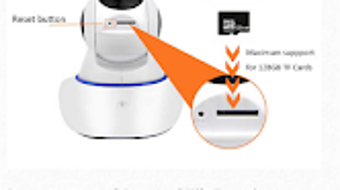
- Reset & Configuration Support – Clear procedures for resetting the yyp2p Yoosee IP camera and adjusting camera parameters such as resolution, recording settings, and privacy modes.
- Issue Troubleshooting – Comprehensive solutions for common problems, including connection failures, poor video quality, and app synchronization errors.
These features are designed to reduce user frustration and improve the overall experience with Yoosee cameras. For instance, users can quickly resolve Wi-Fi pairing issues by following the app’s guided steps, or enable night vision for 24/7 monitoring. The guide also helps users share recorded videos with family members securely, enhancing collaborative safety efforts.
User Interface, Workflow & Performance
The user interface of the Yoosee Smart Camera Guide is structured to support easy navigation through its educational content. The app employs a clean, text-based layout with categorized sections, making it simple to locate specific topics such as setup, troubleshooting, or advanced features. Navigation is intuitive, relying on a menu system that allows users to jump between sections without requiring prior technical knowledge.
The workflow is linear and logical, guiding users through each stage of camera management from initial installation to advanced customization. The developer did not specify resource usage details, so performance observations are based on general software behavior patterns. The app operates smoothly on standard Android devices, with minimal impact on battery or memory.
Stability appears consistent during typical use, with no reported crashes or freezes in available user data. However, actual performance may vary depending on device specifications and network conditions. The app does not require constant internet access for offline reference, which enhances usability in low-connectivity environments.
Compatibility & System Requirements
The Yoosee Smart Camera Guide is designed for Android operating systems and is available for free download. The developer did not provide additional system requirements, so exact compatibility details are limited. Installation size and hardware specifications were not disclosed.
Platform compatibility information is partially provided, indicating that the app runs on Android devices. Users should ensure their device meets the minimum Android version required by the app, though this information was not specified. The app is intended for use with Yoosee smart cameras, particularly models such as the Yoosee smart camera v2.2.
It supports integration with both mobile and PC-based systems for viewing and managing camera feeds. While the guide covers PC and laptop usage, the exact compatibility with different desktop platforms was not detailed. Users are advised to check their device’s compatibility with the latest Android version and ensure their Yoosee camera model is supported.
Pros and Cons
Pros
- Free to download and use, making it accessible to a broad audience.
- Comprehensive, step-by-step guidance for all major Yoosee camera functions.
- Supports advanced features like object tracking and two-way audio.
- Available offline, allowing access without an internet connection.
- Designed specifically for Android, ensuring smooth integration with mobile devices.
Cons
- No information on system requirements or minimum Android version.
- Limited to Android platform; no support for iOS or desktop operating systems.
- Does not include video tutorials or interactive elements.
- Developer did not provide details on update frequency or future feature roadmap.
- Relies solely on text-based content, which may be less engaging for visual learners.
FAQ Section
Is the Yoosee Smart Camera Guide available for iOS devices?
The app is currently only available for Android devices. There is no official iOS version available at this time.
Can I use the guide without an internet connection?
Yes, the app supports offline access, allowing users to view setup instructions and troubleshooting guides without an active internet connection.
Does the app require a subscription or in-app purchases?
No, the Yoosee Smart Camera Guide is free to download and use with no hidden fees or in-app purchases.
How often is the guide updated?
The developer did not specify the update frequency. Users are encouraged to check the app store for the latest version.
Is the app secure and safe to download?
As a free app from Kondevstudio, it is available through official Android channels. Users are advised to download only from trusted sources to ensure security.
Final Thoughts + CTA
The Yoosee Smart Camera Guide stands out as a practical, no-cost resource for anyone using or planning to use a Yoosee smart camera. With its clear, structured content and focus on real-world application, it effectively bridges the gap between complex camera features and everyday users. While it lacks multimedia elements and cross-platform support, its text-based approach ensures reliability and accessibility.
The guide is especially valuable for beginners who need reliable, step-by-step instructions for setup, troubleshooting, and advanced features like object tracking. For users seeking a free, dedicated tool to maximize their Yoosee camera’s potential, this app delivers consistent value. Its offline functionality and focus on Android integration make it a solid choice for mobile-first users.
Download Yoosee Smart Camera Guide now and take full control of your smart surveillance setup.







